Wellness supplement: Figma to Unbounce landing page
A Figma to Unbounce landing page for a longevity supplement brand, with a custom-coded gallery, plan selector, ingredient explorer and FAQ.
- Client
- Longevity supplement brand
- Industry
- Health & wellness · DTC supplements
- Platform
- Unbounce
The challenge
The client, a direct-to-consumer longevity supplement brand, had a finished landing page design in Figma for its daily wellness chew and needed it built in Unbounce for paid traffic.
The design was rich for a landing page: a product gallery, subscription plans with savings badges, a comparison table, an interactive ingredient explorer, review sliders and a long FAQ. Unbounce has no built-in carousels, tabs or accordions, so the build had to match the Figma file closely while keeping every interactive piece working on desktop and mobile.
What we built
We converted the Figma design into an Unbounce page section by section, keeping the spacing, type and colours true to the file, and added custom code wherever Unbounce’s standard widgets stopped.
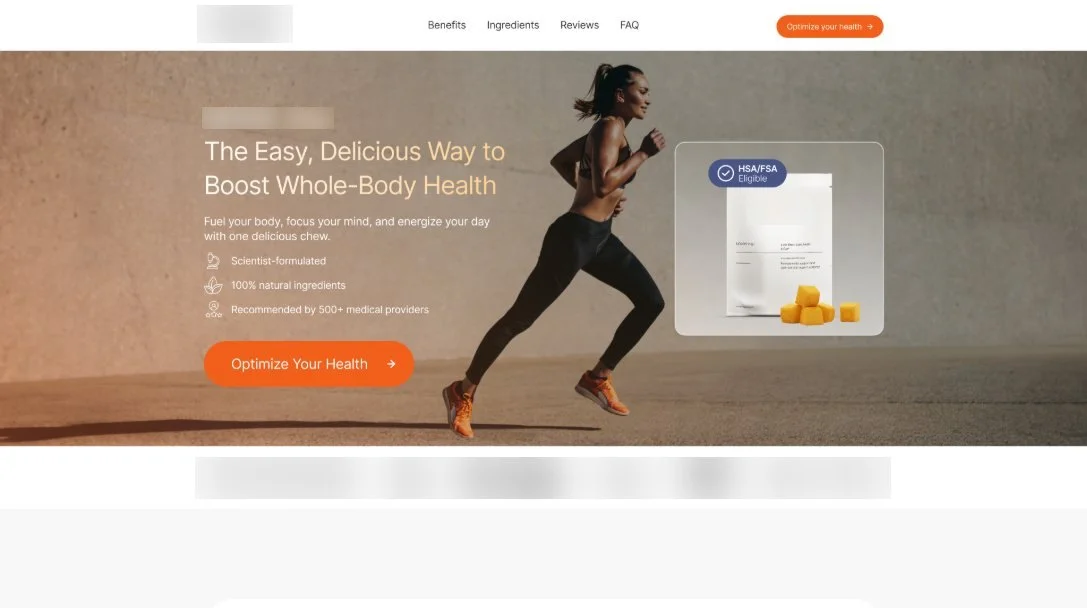
- Hero: product headline, three trust points, the main call to action and a product card with an HSA/FSA-eligible badge, followed by a press logo row.
- Benefits and proof points: a featured review, three benefit cards with ingredient tags, and three “100%” fact rows.
- Product and pricing block: an image gallery with thumbnails and arrows, plus selectable subscription plans (annual, semi-annual, monthly and one-time) with savings badges and an add-to-cart button, built with custom code.
- Social proof: customer photo testimonials and a review slider on a dark band with the overall rating.
- Comparison table: the product against other brands, row by row, ending in a shop button.
- Ingredient explorer: a clickable list of the seven ingredients that swaps the detail card and image, built with custom code.
- Expert panel, final call to action and FAQ: four expert cards, a closing image band with a shop button, and an eleven-question FAQ accordion built with custom code.
Figma to Unbounce landing page: what we delivered
- Figma design converted to Unbounce, desktop and mobile layouts
- Custom-coded product gallery, subscription plan selector and review slider
- Custom-coded ingredient explorer and FAQ accordion
- Comparison table, expert cards and repeated shop calls to action